

Defining AI workflows
AI workflows typically require more than just a model call. They need pre- and post-processing steps like retrieving context, managing session history, reformatting inputs, validating outputs, or combining multiple model responses.
A flow is a special Genkit function that wraps your AI logic to provide:
- Type-safe inputs and outputs: Define schemas using Go structs for static and runtime validation
- Streaming support: Stream partial responses or custom data
- Developer UI integration: Test and debug flows with visual traces
- Easy deployment: Deploy as HTTP endpoints to any platform
Flows are lightweight. They’re written like regular functions with minimal abstraction.
Defining and calling flows
Section titled “Defining and calling flows”In its simplest form, a flow just wraps a function. The following example wraps a function that makes a model generation request:
package main
import (    "context"
    "github.com/firebase/genkit/go/ai"    "github.com/firebase/genkit/go/genkit"    "github.com/firebase/genkit/go/plugins/googlegenai")
func main() {    ctx := context.Background()
    g := genkit.Init(ctx,        genkit.WithPlugins(&googlegenai.GoogleAI{}),    )
    type MenuSuggestionInput struct {        Theme string `json:"theme"`    }
    type MenuSuggestionOutput struct {        MenuItem string `json:"menuItem"`    }
    menuSuggestionFlow := genkit.DefineFlow(g, "menuSuggestionFlow",        func(ctx context.Context, input MenuSuggestionInput) (MenuSuggestionOutput, error) {            resp, err := genkit.Generate(ctx, g,                ai.WithPrompt("Invent a menu item for a %s themed restaurant.", input.Theme),            )            if err != nil {                return MenuSuggestionOutput{}, err            }
            return MenuSuggestionOutput{MenuItem: resp.Text()}, nil        })}
Just by wrapping your generate calls like this, you add some functionality: doing so lets you run the flow from the Genkit CLI and from the developer UI, and is a requirement for several of Genkit’s features, including deployment and observability (later sections discuss these topics).
Input and output schemas
Section titled “Input and output schemas”One of the most important advantages Genkit flows have over directly calling a model API is type safety of both inputs and outputs. When defining flows, you can define schemas for them.
You can define schemas using Go structs with JSON tags. While you can use primitive types directly as input and output parameters, it’s considered best practice to use struct-based schemas for these reasons:
- Better developer experience: Struct-based schemas provide a better experience in the Developer UI by giving you labeled input fields.
- Future-proof API design: Struct-based schemas allow for easy extensibility in the future. You can add new fields to your input or output schemas without breaking existing clients, which is a core principle of robust API design.
All examples in this documentation use struct-based schemas to follow these best practices.
Here’s a refinement of the last example, which defines a flow that takes a string as input and outputs an object:
type MenuSuggestionInput struct {    Theme string `json:"theme"`}
type MenuItem struct {    Name        string `json:"name"`    Description string `json:"description"`}
menuSuggestionFlow := genkit.DefineFlow(g, "menuSuggestionFlow",    func(ctx context.Context, input MenuSuggestionInput) (MenuItem, error) {        item, _, err := genkit.GenerateData[MenuItem](ctx, g,            ai.WithPrompt("Invent a menu item for a %s themed restaurant.", input.Theme),        )        return item, err    })
Note that the schema of a flow does not necessarily have to line up with the schema of the model generation calls within the flow (in fact, a flow might not even contain model calls). Here’s a variation of the example that uses the structured output to format a simple string, which the flow returns.
Note how we pass MenuItem as a type parameter; this is the equivalent of passing the
WithOutputType() option and getting a value of that type in response.
type MenuSuggestionInput struct {    Theme string `json:"theme"`}
type MenuItem struct {    Name        string `json:"name"`    Description string `json:"description"`}
type FormattedMenuOutput struct {    FormattedMenuItem string `json:"formattedMenuItem"`}
menuSuggestionMarkdownFlow := genkit.DefineFlow(g, "menuSuggestionMarkdownFlow",    func(ctx context.Context, input MenuSuggestionInput) (FormattedMenuOutput, error) {        item, _, err := genkit.GenerateData[MenuItem](ctx, g,            ai.WithPrompt("Invent a menu item for a %s themed restaurant.", input.Theme),        )        if err != nil {            return FormattedMenuOutput{}, err        }
        return FormattedMenuOutput{            FormattedMenuItem: fmt.Sprintf("**%s**: %s", item.Name, item.Description),        }, nil    })
Calling flows
Section titled “Calling flows”Once you’ve defined a flow, you can call it from your code:
output, err := menuSuggestionFlow.Run(context.Background(), MenuSuggestionInput{Theme: "bistro"})The argument to the flow must conform to the input schema.
If you defined an output schema, the flow response will conform to it. For
example, if you set the output schema to MenuItemSchema, the flow output will
contain its properties:
item, err := menuSuggestionFlow.Run(context.Background(), MenuSuggestionInput{Theme: "bistro"})if err != nil {    log.Fatal(err)}
log.Println(item.Name)log.Println(item.Description)
Streaming flows
Section titled “Streaming flows”Flows support streaming using an interface similar to the model generation streaming interface. Streaming is useful when your flow generates a large amount of output, because you can present the output to the user as it’s being generated, which improves the perceived responsiveness of your app. As a familiar example, chat-based LLM interfaces often stream their responses to the user as they are generated.
Here’s an example of a flow that supports streaming:
Using iterator-based streaming
Section titled “Using iterator-based streaming”The recommended approach for streaming within flows is to use genkit.GenerateStream()
or genkit.GenerateDataStream[T](), which return iterators that integrate naturally
with Go’s range syntax:
type MenuItem struct {    Name        string `json:"name"`    Description string `json:"description"`}
menuSuggestionFlow := genkit.DefineStreamingFlow(g, "menuSuggestionFlow",    func(ctx context.Context, theme string, sendChunk core.StreamCallback[string]) (string, error) {        stream := genkit.GenerateStream(ctx, g,            ai.WithPrompt("Invent a menu item for a %s themed restaurant.", theme),        )
        for result, err := range stream {            if err != nil {                return "", err            }            if result.Done {                return result.Response.Text(), nil            }            // Pass each chunk to the flow's output stream            sendChunk(ctx, result.Chunk.Text())        }
        return "", nil    })
For structured output with strong typing, use genkit.GenerateDataStream[T]():
type MenuItem struct {    Name        string `json:"name"`    Description string `json:"description"`}
menuSuggestionFlow := genkit.DefineStreamingFlow(g, "menuSuggestionFlow",    func(ctx context.Context, theme string, sendChunk core.StreamCallback[*MenuItem]) (*MenuItem, error) {        stream := genkit.GenerateDataStream[*MenuItem](ctx, g,            ai.WithPrompt("Invent a menu item for a %s themed restaurant.", theme),        )
        for result, err := range stream {            if err != nil {                return nil, err            }            if result.Done {                // result.Output is strongly typed as *MenuItem                return result.Output, nil            }            // result.Chunk is also strongly typed as *MenuItem            sendChunk(ctx, result.Chunk)        }
        return nil, nil    })
The iterator pattern makes the streaming logic clear and linear, avoiding nested callbacks and making error handling straightforward with Go’s standard patterns.
Using callback-based streaming
Section titled “Using callback-based streaming”Alternatively, you can use the callback-based approach with ai.WithStreaming().
This is useful when you need to combine streaming with other Generate options
or when integrating with existing callback-based code:
type MenuSuggestionInput struct {    Theme string `json:"theme"`}
type Menu struct {    Theme  string     `json:"theme"`    Items  []MenuItem `json:"items"`}
type MenuItem struct {    Name        string `json:"name"`    Description string `json:"description"`}
menuSuggestionFlow := genkit.DefineStreamingFlow(g, "menuSuggestionFlow",    func(ctx context.Context, input MenuSuggestionInput, callback core.StreamCallback[string]) (Menu, error) {        item, _, err := genkit.GenerateData[MenuItem](ctx, g,            ai.WithPrompt("Invent a menu item for a %s themed restaurant.", input.Theme),            ai.WithStreaming(func(ctx context.Context, chunk *ai.ModelResponseChunk) error {                // Process the chunk and send it to the flow's output stream                return callback(ctx, chunk.Text())            }),        )        if err != nil {            return Menu{}, err        }
        return Menu{            Theme: input.Theme,            Items: []MenuItem{item},        }, nil    })
The string type in StreamCallback[string] specifies the type of
values your flow streams. This does not necessarily need to be the same
type as the return type, which is the type of the flow’s complete output
(Menu in this example).
In both examples, the values streamed by the flow are directly coupled to the values streamed by the generation call inside the flow. Although this is often the case, it doesn’t have to be: you can output values to the stream using the callback as often as is useful for your flow.
Using channel-based streaming (experimental)
Section titled “Using channel-based streaming (experimental)”For a more idiomatic Go approach, you can use the experimental channel-based streaming API. Instead of a callback, your flow function receives a channel to which it writes stream chunks:
import (    "context"
    "github.com/firebase/genkit/go/ai"    "github.com/firebase/genkit/go/genkit"    x "github.com/firebase/genkit/go/genkit/x")
jokeFlow := x.DefineStreamingFlow(g, "jokeFlow",    func(ctx context.Context, topic string, streamCh chan<- string) (string, error) {        for chunk, err := range genkit.GenerateStream(ctx, g,            ai.WithPrompt("Tell me a joke about %s.", topic),        ) {            if err != nil {                return "", err            }            if chunk.Done {                return chunk.Response.Text(), nil            }            select {            case streamCh <- chunk.Chunk.Text():            case <-ctx.Done():                return "", ctx.Err()            }        }        return "", nil    })
The channel-based API:
- Passes a send-only channel (
chan<- string) to your function instead of a callback - The channel is managed by the framework and closed automatically after your function returns
- Your function should NOT close the channel
- Use a
selectstatement withctx.Done()to handle cancellation gracefully
The returned flow works identically to callback-based flows and can be run
with either Run() or Stream().
Calling streaming flows
Section titled “Calling streaming flows”Streaming flows can be run like non-streaming flows with
menuSuggestionFlow.Run(ctx, MenuSuggestionInput{Theme: "bistro"}) or they can be streamed:
streamCh, err := menuSuggestionFlow.Stream(context.Background(), MenuSuggestionInput{Theme: "bistro"})if err != nil {    log.Fatal(err)}
for result := range streamCh {    if result.Err != nil {        log.Fatalf("Stream error: %v", result.Err)    }    if result.Done {        log.Printf("Menu with %s theme:\n", result.Output.Theme)        for _, item := range result.Output.Items {            log.Printf(" - %s: %s", item.Name, item.Description)        }    } else {        log.Println("Stream chunk:", result.Stream)    }}
Running flows from the command line
Section titled “Running flows from the command line”You can run flows from the command line using the Genkit CLI tool:
genkit flow:run menuSuggestionFlow '{"theme": "French"}'For streaming flows, you can print the streaming output to the console by adding
the -s flag:
genkit flow:run menuSuggestionFlow '{"theme": "French"}' -sRunning a flow from the command line is useful for testing a flow, or for running flows that perform tasks needed on an ad hoc basis—for example, to run a flow that ingests a document into your vector database.
Debugging flows
Section titled “Debugging flows”One of the advantages of encapsulating AI logic within a flow is that you can test and debug the flow independently from your app using the Genkit developer UI.
The developer UI relies on the Go app continuing to run, even if the logic has
completed. If you are just getting started and Genkit is not part of a broader
app, add select {} as the last line of main() to prevent the app from
shutting down so that you can inspect it in the UI.
To start the developer UI, run the following command from your project directory:
genkit start -- go run .From the Run tab of developer UI, you can run any of the flows defined in your project:
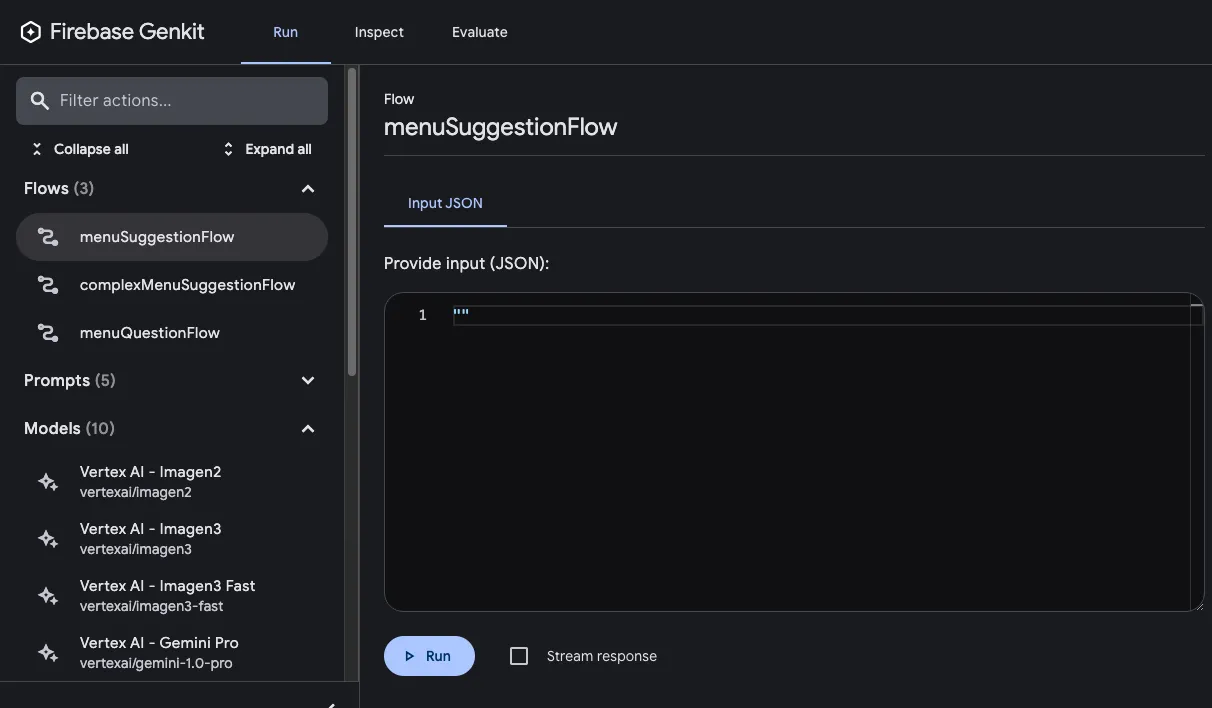
After you’ve run a flow, you can inspect a trace of the flow invocation by either clicking View trace or looking at the Inspect tab.
Flow steps
Section titled “Flow steps”Each of Genkit’s fundamental actions show up as separate steps in the trace viewer:
genkit.Generate()genkit.Embed()genkit.Retrieve()
If you want to include code other than the above in your traces, you can do so
by wrapping the code in a genkit.Run() call. You might do this for calls to
third-party libraries that are not Genkit-aware, or for any critical section of
code.
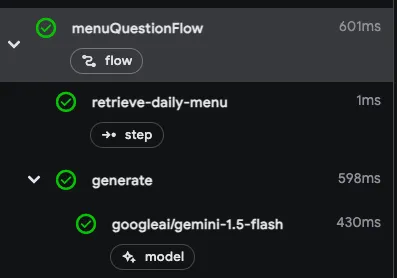
For example, here’s a flow with two steps: the first step retrieves a menu using
some unspecified method, and the second step includes the menu as context for a
genkit.Generate() call.
type MenuQuestionInput struct {    Question string `json:"question"`}
type MenuQuestionOutput struct {    Answer string `json:"answer"`}
menuQuestionFlow := genkit.DefineFlow(g, "menuQuestionFlow",    func(ctx context.Context, input MenuQuestionInput) (MenuQuestionOutput, error) {        menu, err := genkit.Run(ctx, "retrieve-daily-menu", func() (string, error) {            // Retrieve today's menu. (This could be a database access or simply            // fetching the menu from your website.)
            // ...
            return menu, nil        })        if err != nil {            return MenuQuestionOutput{}, err        }
        resp, err := genkit.Generate(ctx, g,            ai.WithPrompt(input.Question),            ai.WithSystem("Help the user answer questions about today's menu."),            ai.WithDocs(ai.NewTextPart(menu)),        )        if err != nil {            return MenuQuestionOutput{}, err        }
        return MenuQuestionOutput{Answer: resp.Text()}, nil    })
Because the retrieval step is wrapped in a genkit.Run() call, it’s included as a step
in the trace viewer:
Deploying flows
Section titled “Deploying flows”You can deploy your flows directly as web API endpoints, ready for you to call from your app clients. Deployment is discussed in detail on several other pages, but this section gives brief overviews of your deployment options.
net/http Server
Section titled “net/http Server”To deploy a flow using any Go hosting platform, such as Cloud Run, define
your flow using genkit.DefineFlow() and start a net/http server with the
provided flow handler using genkit.Handler():
package main
import (    "context"    "log"    "net/http"
    "github.com/firebase/genkit/go/ai"    "github.com/firebase/genkit/go/genkit"    "github.com/firebase/genkit/go/plugins/googlegenai"    "github.com/firebase/genkit/go/plugins/server")
type MenuSuggestionInput struct {    Theme string `json:"theme"`}
type MenuItem struct {    Name        string `json:"name"`    Description string `json:"description"`}
func main() {    ctx := context.Background()
    g := genkit.Init(ctx, genkit.WithPlugins(&googlegenai.GoogleAI{}))
    menuSuggestionFlow := genkit.DefineFlow(g, "menuSuggestionFlow",        func(ctx context.Context, input MenuSuggestionInput) (MenuItem, error) {            item, _, err := genkit.GenerateData[MenuItem](ctx, g,                ai.WithPrompt("Invent a menu item for a %s themed restaurant.", input.Theme),            )            return item, err        })
    mux := http.NewServeMux()    mux.HandleFunc("POST /menuSuggestionFlow", genkit.Handler(menuSuggestionFlow))    log.Fatal(server.Start(ctx, "127.0.0.1:3400", mux))}
server.Start() is an optional helper function that starts the server and
manages its lifecycle, including capturing interrupt signals to ease local
development, but you may use your own method.
To serve all the flows defined in your codebase, you can use
genkit.ListFlows():
mux := http.NewServeMux()for _, flow := range genkit.ListFlows(g) { mux.HandleFunc("POST /"+flow.Name(), genkit.Handler(flow))}log.Fatal(server.Start(ctx, "127.0.0.1:3400", mux))Other server frameworks
Section titled “Other server frameworks”You can also use other server frameworks to deploy your flows. For example, you can use Gin with just a few lines:
router := gin.Default()for _, flow := range genkit.ListFlows(g) { router.POST("/"+flow.Name(), func(c *gin.Context) { genkit.Handler(flow)(c.Writer, c.Request) })}log.Fatal(router.Run(":3400"))Calling deployed flows
Section titled “Calling deployed flows”Once your flow is deployed, you can call it with a POST request:
curl -X POST "http://localhost:3400/menuSuggestionFlow" \ -H "Content-Type: application/json" -d '{"data": {"theme": "banana"}}'For streaming responses, you can add the Accept: text/event-stream header:
curl -X POST "http://localhost:3400/menuSuggestionFlow" \ -H "Content-Type: application/json" \ -H "Accept: text/event-stream" \ -d '{"data": {"theme": "banana"}}'You can also use the Genkit web client library to call flows from web applications. See Accessing flows from the client for detailed examples of using the runFlow() and streamFlow() functions.
Learn more about deployment
Section titled “Learn more about deployment”For detailed deployment instructions and platform-specific guides, see: