Build agentic apps that do more than chat
Genkit is an open-source AI SDK and toolkit for building full-stack agentic experiences for any platform. Available in TypeScript, Go, Dart, and Python
npm i genkit @genkit-ai/google-genai go get github.com/firebase/genkit/go pip install genkit genkit-google-genai dart pub add genkit genkit_google_genai npx skills add genkit-ai/skills What will you build?
Try live demosChat assistants
Support, shopping, and in-app help that answers in real time.
Example: A chat assistant recommends the right pricing plan for a team of five.
Documents into data
Turn receipts, invoices, and PDFs into clean, structured data.
Example: A photo of a café receipt becomes structured fields for merchant, date, total, and category.
Answers from your content
Ask your docs, help center, or files. Get answers with sources.
Example: An assistant answers a vacation policy question and cites the employee handbook.
Images and media
Generate product shots, art, and marketing copy from a prompt.
Example: One text prompt generates product photos of a speckled mug in three glazes.



Agents that take action
Look things up, call your APIs, and ask a person before anything important.
Example: An agent looks up an order, checks the refund policy, and waits for a person to approve the refund.
GenUI
Answer with charts, forms, and buttons people can tap, not walls of text.
Example: Asked how the quarter went, an assistant answers with an interactive revenue chart instead of a paragraph.
Any model. Your language. Every step visible.
Genkit connects your app to AI models, calls your code, and shows every step to you and to your coding agent.
-
Build it with your coding agent
Genkit gives coding agents guardrails, not guesswork. Agent skills teach Antigravity, Claude Code, and Cursor today's Genkit APIs. The Genkit MCP server lets them run your flows and read the traces, so they check their own work before you review it.
- you › Add a flow that summarizes support tickets and tags their priority.
- skill developing-genkit-js
- edit src/flows/summarize-ticket.ts
- mcp run_flow summarizeTicket
- mcp get_trace → generate · output
- agent › Done. summarizeTicket returns a summary and a priority, and the trace shows each step ran as expected.
-
Pick any model
Gemini, Claude, OpenAI, open models with Ollama, and more. Switching is one line.
const ai = genkit({ plugins: [googleAI(), anthropic(), openAI(), ollama()], }); const { text } = await ai.generate({ model: googleAI.model('gemini-flash-latest'), model: anthropic.model('claude-opus-4-8'), model: openAI.model('gpt-5.5'), model: ollama.model('gemma4:latest'), prompt: 'Summarize this support ticket', }); -
Build in your language
Official SDKs for TypeScript, Go, Python, and Dart, built on the same concepts.
- TypeScript GA
await ai.generate({ prompt }) - Go GA
genkit.Generate(ctx, g, ai.WithPrompt(prompt)) - Python Preview
await ai.generate(prompt=prompt) - Dart GA
await ai.generate(prompt: prompt)
-
-
Test it, then ship it
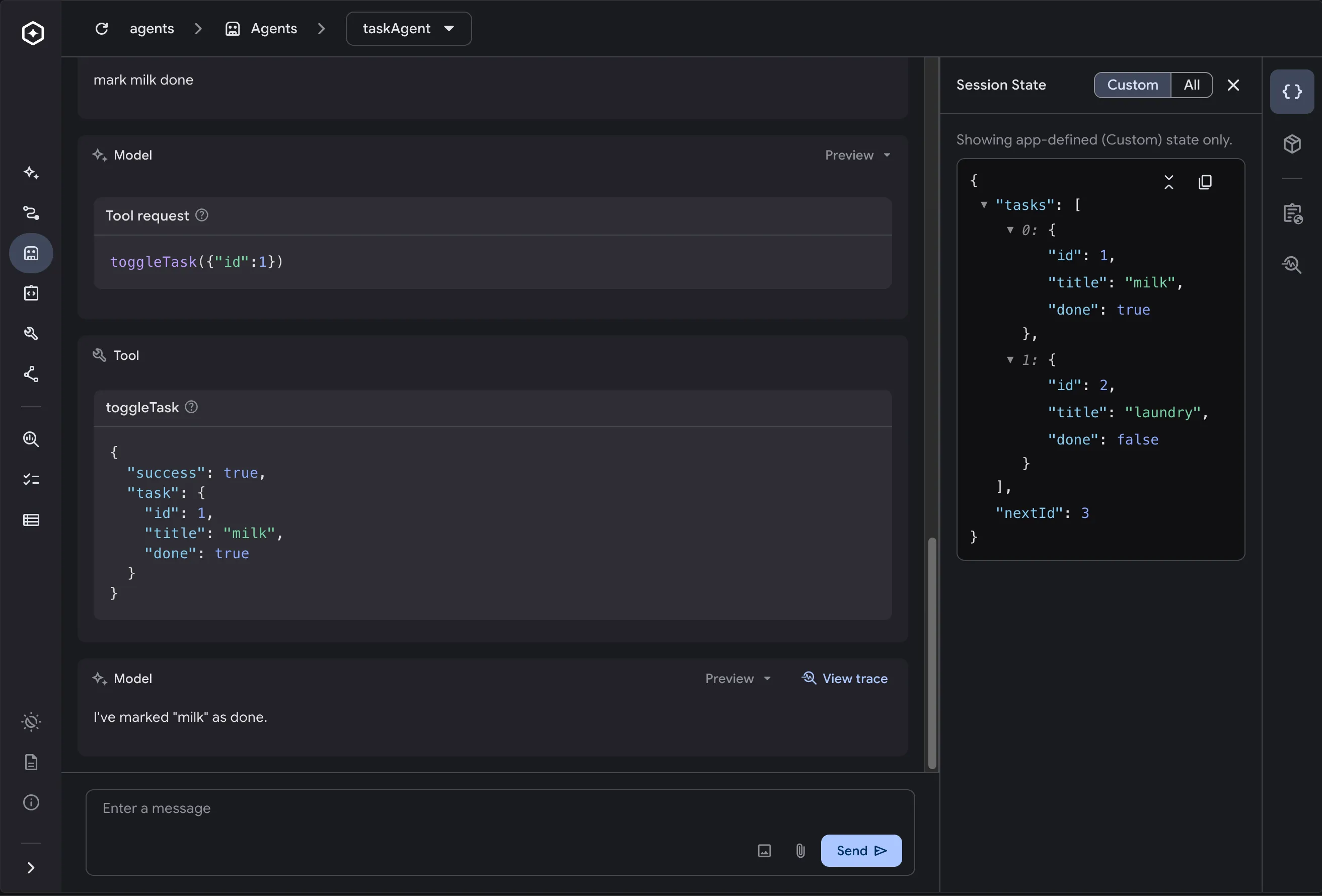
See every prompt, tool call, and response in the local Developer UI. Then deploy to Cloud Run, Firebase, or anywhere your code runs.
Frequently asked questions
Can't find what you're looking for? Ask the community on Discord.
What is Genkit?
Genkit is an open-source framework from Google for building AI features into apps. It gives you one consistent way to call AI models, connect them to your data and code, and test and deploy the results, in TypeScript, Go, Python, or Dart.
Do I need to be an AI expert to use Genkit?
No. If you can build an app, you can build with Genkit. Common features like chat, structured data, and answers from your content take a few lines of code. You can also install Genkit skills so AI coding assistants like Antigravity, Claude Code, and Cursor can write Genkit code for you.
Build with AI coding assistants → How is Genkit different from calling a model's API directly?
A model API sends a prompt and returns a response. Genkit adds what real apps need on top: one API across model providers, structured output, tool calling, retrieval, streaming, agents, and a local Developer UI that traces every step. You can switch models without rewriting your app.
Which AI models does Genkit support?
Gemini (through the Gemini API or Gemini Enterprise), Anthropic Claude, OpenAI, xAI Grok, DeepSeek, models hosted on AWS Bedrock and Azure AI Foundry, open models like Gemma and Llama through Ollama, and any OpenAI-compatible API.
See all model providers → Which programming languages can I use?
Genkit has official SDKs for TypeScript and JavaScript, Go, Python, and Dart.
Get started in your language → Is Genkit free?
Yes. Genkit is free and open source under the Apache 2.0 license. You only pay for the models and hosting you choose to use.
View the source on GitHub → Where can I deploy Genkit apps?
Anywhere your code runs. The docs include guides for Cloud Run, Firebase, AWS Lambda, and Azure Functions, and you can run Genkit on any server that supports your language.
Read the deployment guides →