

Full-stack agents
Genkit agents package the model loop, message history, tool calls, streaming, and persistence behind one API. You define the agent on the server, then call the same conversational interface in process or through HTTP.
Genkit agents are useful when your app needs an assistant, an approval workflow, a long-running generator, or a coordinator that delegates work to specialized agents. They build on Genkit prompts and generate() calls, so they can use models, tools, middleware, and developer tooling from the rest of Genkit.
When to choose Genkit agents
Section titled “When to choose Genkit agents”Use standard Genkit flows and generate() primitives when you want full control over the application’s API shape, persistence model, orchestration, and frontend protocol. A flow is often the right fit for request and response tasks, explicit backend workflows, scheduled jobs, and systems where your app already owns every step of state management.
Use Genkit agents when the feature is naturally conversational or iterative. They handle the repeated work that chat-based applications need, including message history, streaming updates, tool turns, snapshots, aborts, interrupts, background execution, and continuation from a previous turn. They are a strong fit for persistent chat applications, conversational product experiences, approval workflows, task copilots, and multi-turn generation where the model refines output over several steps.
Genkit agents are also designed for seamless frontend integration. A browser or mobile client can use the same chat() interface for local and remote agents, receive streamed text, state patches, artifacts, and tool interruptions, then continue the next turn without rebuilding the transport protocol. You can build the same capabilities with flows and generate() if you need maximum architectural control, but agents remove much of the plumbing for persistent, interactive AI features.
All agent APIs are imported from genkit/beta on the server and genkit/beta/client on the client. This includes genkit(), session stores, remoteAgent(), and the shared agent types.
The samples in this section are based on the agents test app.
Your first agent
Section titled “Your first agent”The simplest agent needs a name and a system prompt. Start a chat and send a message:
import { genkit } from 'genkit/beta';import { googleAI } from '@genkit-ai/google-genai';
const ai = genkit({  plugins: [googleAI()],  model: googleAI.model('gemini-flash-latest'),});
const assistant = ai.defineAgent({  name: 'assistant',  system: 'You are a helpful assistant.',});
const chat = assistant.chat();const res = await chat.send('Hello. What can you do?');
console.log(res.text);
You can reference a model with the plugin helper, such as googleAI.model('gemini-flash-latest'), or with the string ID, such as 'googleai/gemini-flash-latest'.
Common path
Section titled “Common path”Most production agents grow in this order:
- Define the agent with a model, instructions, and tools.
- Call it locally with
chat().send()orchat().sendStream(). - Add a session store when the server should own history.
- Serve it over HTTP with a primary endpoint and optional snapshot and abort endpoints.
- Use
remoteAgent()from a browser, mobile app, or another server.
Develop with the Genkit Dev UI
Section titled “Develop with the Genkit Dev UI”The Genkit Developer UI lets you chat with your agents, inspect their full execution, and iterate quickly without writing any frontend code. When you run your app with the Genkit CLI, agents appear alongside your flows, prompts, and models so you can send messages, watch streamed responses, step through tool calls, and review session state.
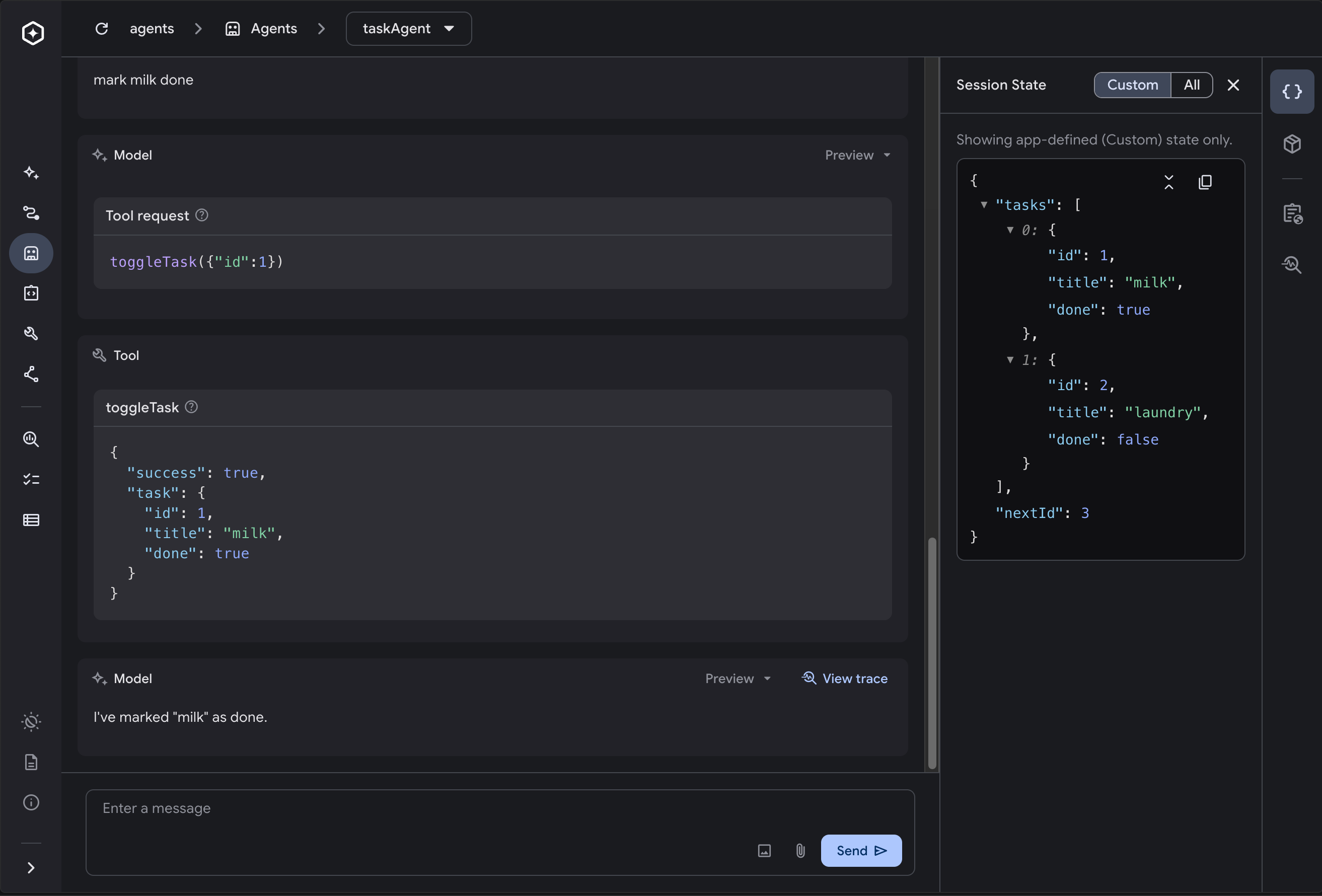
This makes the Dev UI a fast way to test conversational behavior, debug tool turns, and verify interrupts and continuation before wiring up a client. You can also inspect detailed execution traces for each turn to see model calls, tool invocations, latency, and token usage.
Where to go next
Section titled “Where to go next”- Define agents covers
defineAgent,definePromptAgent, tools, and Dotprompt backed agents. - Run and stream covers
chat(),loadChat(),send,sendStream,resume, and response types. - Serve over HTTP covers Express routes,
remoteAgent(), the JavaScript client, and a Vercel AI SDK UI integration. - Sessions and state covers server-managed stores, client-managed state, snapshots, branching, custom state, and artifacts.
- Session stores covers built-in stores, production recommendations, and custom store implementations.
- Interrupts covers human approval and resumable tool calls.
- Background execution covers detached turns, polling, waiting, aborting, and snapshot status values.
- Multi-agent delegation covers the
agents()middleware anddelegate_to_*tools. - Custom orchestration covers
defineCustomAgentand custom turn loops for advanced workflows. - Error handling covers agent errors, tool errors, and Go failure tiers.
The Agents API is available from the experimental Genkit packages. It supports server-side agents, session stores, HTTP routes, custom state, interrupts, background work, and JavaScript clients that call agent routes.
The Go examples in this section follow go/samples/basic-agents, which defines seven agents in seven styles behind one command-line client, and go/samples/basic-agents-server, which serves the same kind of agent over plain HTTP.
Install
Section titled “Install”The Agents API requires Genkit Go v1.10.0 or later.
go get github.com/firebase/genkit/goThe Agents API is in preview (genkit/exp) and may experience breaking changes in minor version releases.
Your first agent
Section titled “Your first agent”package main
import ( "context" "fmt" "log"
"github.com/firebase/genkit/go/ai" aix "github.com/firebase/genkit/go/ai/exp" "github.com/firebase/genkit/go/genkit" genkitx "github.com/firebase/genkit/go/genkit/exp" "github.com/firebase/genkit/go/plugins/googlegenai")
func main() { ctx := context.Background()
g := genkit.Init(ctx, genkit.WithExperimental(), genkit.WithPlugins(&googlegenai.GoogleAI{}), )
assistant := genkitx.DefineAgent[any](g, "assistant", aix.InlinePrompt{ ai.WithModelName("googleai/gemini-flash-latest"), ai.WithSystem("You are a helpful assistant."), }, )
out, err := assistant.RunText(ctx, "Hello. What can you do?") if err != nil { // A non-nil error means the turn never produced a result, such as a // rejected init payload or a cancelled context. log.Fatalf("run assistant: %v", err) }
fmt.Println(out.Message.Text())}DefineAgent infers its custom state type from a typed option such as aix.WithSessionStore. This agent passes none, so the type argument is written out as any.
Go drives a conversation with Run, RunText, and Connect. There is no Chat type in Go: that surface belongs to the JavaScript, Python, and Dart clients, which can call a Go agent over its HTTP routes.
Common path
Section titled “Common path”Most production agents grow in this order:
- Define the agent with an inline prompt or a named prompt.
- Call it with
Run,RunText, orConnect. - Add a session store when the server should own history.
- Expose the agent with the experimental HTTP routes.
- Call the Go route from a JavaScript client or any HTTP client.
Develop with the Genkit Dev UI
Section titled “Develop with the Genkit Dev UI”The Genkit Developer UI lets you chat with your agents, inspect their full execution, and iterate quickly without writing any frontend code. When you run your app with the Genkit CLI, agents appear alongside your flows, prompts, and models so you can send messages, watch streamed responses, step through tool calls, and review session state.
This makes the Dev UI a fast way to test conversational behavior, debug tool turns, and verify interrupts and continuation before wiring up a client. You can also inspect detailed execution traces for each turn to see model calls, tool invocations, latency, and token usage.
Where to go next
Section titled “Where to go next”-
Define agents covers
DefineAgent,DefinePromptAgent, inline prompts, named prompts, and typed state. -
Run and stream covers request and response shapes, streaming, and continuation.
-
Serve over HTTP covers Go routes, curl examples, the JavaScript client, and a Vercel AI SDK UI integration.
-
Sessions and state covers stores, snapshots, branching, redaction, custom state, and artifacts.
-
Session stores covers built-in stores, production recommendations, and custom store implementations.
-
Interrupts covers resumable tool calls.
-
Background execution covers detached tasks, waiting on them, aborting, and resuming a stopped run.
-
Multi-agent delegation covers delegation, including sub-agents that run in the background and continuing their work.
-
Custom orchestration covers
DefineCustomAgentand advanced turn loops. -
Error handling covers failed and stopped turns and tool errors.
The Agents API is available in Genkit Dart. It supports local agents, server-managed session stores, HTTP shelf serving, custom state, tool interrupts, background detached work, and remote agent clients.
Agent, session, snapshot, and live/bidirectional (bidi) model symbols live behind experimental imports. Import them from package:genkit/experimental.dart on the server, package:genkit/experimental_client.dart on the client, and package:genkit/experimental_io.dart for dart:io extras such as FileSessionStore. The stable CancellationController and CancellationToken types stay on package:genkit/genkit.dart and package:genkit/client.dart.
Your first agent
Section titled “Your first agent”import 'package:genkit/genkit.dart';import 'package:genkit/experimental.dart';import 'package:genkit_google_genai/genkit_google_genai.dart';
final ai = Genkit( plugins: [googleAI()], model: googleAI.gemini('gemini-flash-latest'),);
final assistant = ai.defineAgent( name: 'assistant', system: 'You are a helpful assistant.',);
void main() async { final chat = assistant.chat(); final res = await chat.send(text: 'Hello. What can you do?');
print(res.text);}Common path
Section titled “Common path”Most production agents grow in this order:
- Define the agent with a model, system instructions, and tools.
- Call it locally with
chat.send()orchat.sendStream(). - Add a session store (
InMemorySessionStoreorFileSessionStore) when the server should own history. - Serve it over HTTP with shelf routes using
shelfHandlerfor the agent turn, snapshot, and abort actions. - Call the agent from a remote client using
remoteAgent().
Develop with the Genkit Dev UI
Section titled “Develop with the Genkit Dev UI”The Genkit Developer UI lets you chat with your agents, inspect their full execution, and iterate quickly without writing any frontend code. When you run your app with the Genkit CLI, agents appear alongside your flows, prompts, and models so you can send messages, watch streamed responses, step through tool calls, and review session state.
This makes the Dev UI a fast way to test conversational behavior, debug tool turns, and verify interrupts and continuation before wiring up a client. You can also inspect detailed execution traces for each turn to see model calls, tool invocations, latency, and token usage.
Where to go next
Section titled “Where to go next”- Define agents covers
defineAgent,defineCustomAgent, tools, and schemas. - Run and stream covers
chat(),loadChat(),send,sendStream, andAgentError. - Serve over HTTP covers shelf route serving and
remoteAgent(). - Sessions and state covers stores, custom state, and functional state updates.
- Session stores covers
InMemorySessionStoreandFileSessionStore. - Interrupts covers tool-based interrupts that return
.interrupt(). - Background execution covers detached background work (
detach), polling, and aborting. - Multi-agent delegation covers agent coordination using the
agents()middleware. - Custom orchestration covers
defineCustomAgentand custom turn loops. - Error handling covers
AgentErrorand recovering last-good state.
The Agents API is available in Genkit Python. It supports local agents, server-managed session stores, FastAPI HTTP serving, custom state, tool interrupts, background detached work, and remote agent clients.
Import agent helpers from genkit.agent. The samples in this section are based on the Python agents samples.
Your first agent
Section titled “Your first agent”from genkit import Genkitfrom genkit_google_genai import GoogleAI
ai = Genkit(plugins=[GoogleAI()])
assistant = ai.define_agent( name='assistant', model='googleai/gemini-flash-latest', system='You are a helpful assistant.',)
async def main() -> None: chat = assistant.chat() res = await chat.send('Hello. What can you do?') print(res.text)
if __name__ == '__main__': ai.run_main(main())Common path
Section titled “Common path”Most production agents grow in this order:
- Define the agent with a model, system instructions, and tools.
- Call it locally with
chat().send()orchat().send_stream(). - Add a session store (
InMemorySessionStoreorFileSessionStore) when the server should own history. - Serve it over HTTP with FastAPI using
serve_agent(). - Call the agent from a remote client using
remote_agent().
Develop with the Genkit Dev UI
Section titled “Develop with the Genkit Dev UI”The Genkit Developer UI lets you chat with your agents, inspect their full execution, and iterate quickly without writing any frontend code. When you run your app with the Genkit CLI, agents appear alongside your flows, prompts, and models so you can send messages, watch streamed responses, step through tool calls, and review session state.
This makes the Dev UI a fast way to test conversational behavior, debug tool turns, and verify interrupts and continuation before wiring up a client. You can also inspect detailed execution traces for each turn to see model calls, tool invocations, latency, and token usage.
Where to go next
Section titled “Where to go next”- Define agents covers
define_agent,define_prompt_agent,define_custom_agent, tools, and schemas. - Run and stream covers
chat(),load_chat(),send,send_stream, streaming, andAgentError. - Serve over HTTP covers FastAPI routes with
serve_agent()andremote_agent(). - Sessions and state covers stores, custom state, and functional state updates.
- Session stores covers
InMemorySessionStoreandFileSessionStore. - Interrupts covers tool interrupts and resume.
- Background execution covers detached work (
detach), polling, and aborting. - Custom orchestration covers
define_custom_agentand custom turn loops. - Error handling covers failed turns and recovering last-good state.