

Defining AI workflows
AI workflows typically require more than just a model call. They need pre- and post-processing steps like retrieving context, managing session history, reformatting inputs, validating outputs, or combining multiple model responses.
A flow is a special Genkit function that wraps your AI logic to provide:
- Type-safe inputs and outputs: Define schemas using Go structs for static and runtime validation
- Streaming support: Stream partial responses or custom data
- Developer UI integration: Test and debug flows with visual traces
- Easy deployment: Deploy as HTTP endpoints to any platform
Flows are lightweight. They’re written like regular functions with minimal abstraction.
Defining and calling flows
Section titled “Defining and calling flows”In its simplest form, a flow just wraps a function. The following example wraps a function that makes a model generation request:
package main
import (    "context"    "fmt"
    "github.com/firebase/genkit/go/ai"    "github.com/firebase/genkit/go/genkit"    "github.com/firebase/genkit/go/plugins/googlegenai")
func main() {    ctx := context.Background()
    g := genkit.Init(ctx,        genkit.WithPlugins(&googlegenai.GoogleAI{}),    )
    type MenuSuggestionInput struct {        Theme string `json:"theme"`    }
    type MenuSuggestionOutput struct {        MenuItem string `json:"menuItem"`    }
    genkit.DefineFlow(g, "menuSuggestionFlow",        func(ctx context.Context, input MenuSuggestionInput) (MenuSuggestionOutput, error) {            resp, err := genkit.Generate(ctx, g,                ai.WithPrompt("Invent a menu item for a %s themed restaurant.", input.Theme),            )            if err != nil {                return MenuSuggestionOutput{}, fmt.Errorf("could not invent a menu item: %w", err)            }
            return MenuSuggestionOutput{MenuItem: resp.Text()}, nil        })}
genkit.Init returns a *genkit.Genkit, and that is the value every other
Genkit call takes. When your flows live in other files, pass it in:
func defineMenuFlows(g *genkit.Genkit).
Just by wrapping your generate calls like this, you add some functionality: doing so lets you run the flow from the Genkit CLI and from the developer UI, and is a requirement for several of Genkit’s features, including deployment and observability (later sections discuss these topics).
Input and output schemas
Section titled “Input and output schemas”One of the most important advantages Genkit flows have over directly calling a model API is type safety of both inputs and outputs. When defining flows, you can define schemas for them.
You can define schemas using Go structs with JSON tags. While you can use primitive types directly as input and output parameters, it’s considered best practice to use struct-based schemas for these reasons:
- Better developer experience: Struct-based schemas provide a better experience in the Developer UI by giving you labeled input fields.
- Future-proof API design: Struct-based schemas allow for easy extensibility in the future. You can add new fields to your input or output schemas without breaking existing clients, which is a core principle of robust API design.
All examples in this documentation use struct-based schemas to follow these best practices.
Here’s a refinement of the last example, which defines a flow that takes a string as input and outputs an object:
type MenuSuggestionInput struct {    Theme string `json:"theme"`}
type MenuItem struct {    Name        string `json:"name"`    Description string `json:"description"`}
menuSuggestionFlow := genkit.DefineFlow(g, "menuSuggestionFlow",    func(ctx context.Context, input MenuSuggestionInput) (MenuItem, error) {        item, resp, err := genkit.GenerateData[MenuItem](ctx, g,            ai.WithPrompt("Invent a menu item for a %s themed restaurant.", input.Theme),        )        if err != nil {            return MenuItem{}, fmt.Errorf("could not invent a menu item: %w", err)        }        // GenerateData answers with a nil value and no error when the        // response carried no text to parse, as an interrupted one does.        if item == nil {            return MenuItem{}, status.Errorf(status.ErrInternal,                "the model returned no menu item (%s)", resp.FinishReason)        }
        return *item, nil    })
genkit.GenerateData[MenuItem] returns a *MenuItem, so a caller has three
things to check in order: the error, then whether the value is nil, and only
then the value itself. A nil value with no error means the response carried
something other than text, such as a tool request or an interrupt, so inspect
resp.FinishReason, resp.Interrupts(), or resp.ToolRequests() to decide
what to do. The
basic-structured sample
works through typed output, including the nested and streaming cases.
status.Errorf comes from github.com/firebase/genkit/go/core/status. It
classifies the failure as INTERNAL so the HTTP boundary can pick a response
code without re-reading the message; see
Handling errors in flows below.
Note that the schema of a flow does not necessarily have to line up with the schema of the model generation calls within the flow (in fact, a flow might not even contain model calls). Here’s a variation of the example that uses the structured output to format a simple string, which the flow returns.
Note how we pass MenuItem as a type parameter; this is the equivalent of passing the
WithOutputType() option and getting a value of that type in response.
type MenuSuggestionInput struct {    Theme string `json:"theme"`}
type MenuItem struct {    Name        string `json:"name"`    Description string `json:"description"`}
type FormattedMenuOutput struct {    FormattedMenuItem string `json:"formattedMenuItem"`}
menuSuggestionMarkdownFlow := genkit.DefineFlow(g, "menuSuggestionMarkdownFlow",    func(ctx context.Context, input MenuSuggestionInput) (FormattedMenuOutput, error) {        item, resp, err := genkit.GenerateData[MenuItem](ctx, g,            ai.WithPrompt("Invent a menu item for a %s themed restaurant.", input.Theme),        )        if err != nil {            return FormattedMenuOutput{}, fmt.Errorf("could not invent a menu item: %w", err)        }        if item == nil {            return FormattedMenuOutput{}, status.Errorf(status.ErrInternal,                "the model returned no menu item (%s)", resp.FinishReason)        }
        return FormattedMenuOutput{            FormattedMenuItem: fmt.Sprintf("**%s**: %s", item.Name, item.Description),        }, nil    })
Calling flows
Section titled “Calling flows”Once you’ve defined a flow, you can call it from your code:
output, err := menuSuggestionFlow.Run(context.Background(), MenuSuggestionInput{Theme: "bistro"})The argument to the flow must conform to the input schema.
If you defined an output schema, the flow response will conform to it. For
example, if you set the output schema to MenuItemSchema, the flow output will
contain its properties:
item, err := menuSuggestionFlow.Run(context.Background(), MenuSuggestionInput{Theme: "bistro"})if err != nil {    log.Fatal(err)}
log.Println(item.Name)log.Println(item.Description)
Streaming flows
Section titled “Streaming flows”Flows support streaming using an interface similar to the model generation streaming interface. Streaming is useful when your flow generates a large amount of output, because you can present the output to the user as it’s being generated, which improves the perceived responsiveness of your app. As a familiar example, chat-based LLM interfaces often stream their responses to the user as they are generated.
Here’s an example of a flow that supports streaming:
A streaming flow is defined with genkit.DefineStreamingFlow, whose function
takes a sendChunk callback alongside the input. What that function looks like
depends on what the flow does with the model’s output. The
basic sample
shows the forwarding shape, and the
basic-structured sample
has both shapes side by side.
The snippets in this section assume these imports:
import (    "context"    "fmt"
    "github.com/firebase/genkit/go/ai"    "github.com/firebase/genkit/go/core"    "github.com/firebase/genkit/go/core/status"    "github.com/firebase/genkit/go/genkit")
core.StreamCallback[T] is a type alias for func(context.Context, T) error,
so writing the function type out longhand is the same declaration.
ai.ModelStreamCallback is that alias with T set to *ai.ModelResponseChunk.
Forwarding the model’s chunks
Section titled “Forwarding the model’s chunks”When the flow passes the model’s output straight through, ai.WithStreaming is
the whole job: hand it the flow’s own sendChunk and the model’s chunks reach
the caller untouched, while genkit.Generate still returns the finished
response.
type MenuSuggestionInput struct {    Theme string `json:"theme"`}
menuSuggestionFlow := genkit.DefineStreamingFlow(g, "menuSuggestionFlow",    func(ctx context.Context, input MenuSuggestionInput, sendChunk ai.ModelStreamCallback) (string, error) {        resp, err := genkit.Generate(ctx, g,            ai.WithPrompt("Invent a menu item for a %s themed restaurant.", input.Theme),            ai.WithStreaming(sendChunk),        )        if err != nil {            return "", fmt.Errorf("could not invent a menu item: %w", err)        }
        return resp.Text(), nil    })
Declaring the callback as ai.ModelStreamCallback is what lets sendChunk be
passed straight through: the flow streams the model’s chunks unchanged, so it
streams the model’s chunk type. To stream something else, wrap the callback and
declare the type you want:
type Menu struct {    Theme string     `json:"theme"`    Items []MenuItem `json:"items"`}
type MenuItem struct {    Name        string `json:"name"`    Description string `json:"description"`}
menuSuggestionFlow := genkit.DefineStreamingFlow(g, "menuSuggestionFlow",    func(ctx context.Context, input MenuSuggestionInput, sendChunk core.StreamCallback[string]) (Menu, error) {        item, resp, err := genkit.GenerateData[MenuItem](ctx, g,            ai.WithPrompt("Invent a menu item for a %s themed restaurant.", input.Theme),            ai.WithStreaming(func(ctx context.Context, chunk *ai.ModelResponseChunk) error {                return sendChunk(ctx, chunk.Text())            }),        )        if err != nil {            return Menu{}, fmt.Errorf("could not invent a menu item: %w", err)        }        if item == nil {            return Menu{}, status.Errorf(status.ErrInternal,                "the model returned no menu item (%s)", resp.FinishReason)        }
        return Menu{            Theme: input.Theme,            Items: []MenuItem{*item},        }, nil    })
The string in core.StreamCallback[string] is the type the flow streams. It
does not have to be the same type as the flow’s complete output (Menu here).
chunk.Text() is the text that just arrived rather than the message so far, so
forwarding it gives a client something to append.
genkit.DefineFlow returns *core.Flow[In, Out, struct{}] and
genkit.DefineStreamingFlow returns *core.Flow[In, Out, Stream], so a flow
that lives in its own file is declared with its concrete type:
func newMenuSuggestionFlow(g *genkit.Genkit) *core.Flow[MenuSuggestionInput, Menu, string] { return genkit.DefineStreamingFlow(g, "menuSuggestionFlow", func(ctx context.Context, input MenuSuggestionInput, sendChunk core.StreamCallback[string]) (Menu, error) { // ... return Menu{}, nil })}genkit.DefineTool returns *ai.ToolAction[In, Out] on the same principle.
Acting on the chunks
Section titled “Acting on the chunks”When the flow has to inspect, filter, or accumulate what arrives, range over
genkit.GenerateStream, which hands you each chunk and then the final response
in one loop:
menuSuggestionFlow := genkit.DefineStreamingFlow(g, "menuSuggestionFlow",    func(ctx context.Context, input MenuSuggestionInput, sendChunk core.StreamCallback[string]) (string, error) {        for result, err := range genkit.GenerateStream(ctx, g,            ai.WithPrompt("Invent a menu item for a %s themed restaurant.", input.Theme),        ) {            if err != nil {                return "", fmt.Errorf("could not invent a menu item: %w", err)            }            if result.Done {                return result.Response.Text(), nil            }            // Forward only the text, dropping the tool traffic a multi-turn            // run also carries.            if text := result.Chunk.Text(); text != "" {                sendChunk(ctx, text)            }        }
        return "", status.Errorf(status.ErrInternal, "the stream ended without a final result")    })
For typed output, genkit.GenerateDataStream[T] does the same with the schema
inferred from T:
menuSuggestionFlow := genkit.DefineStreamingFlow(g, "menuSuggestionFlow",    func(ctx context.Context, input MenuSuggestionInput, sendChunk core.StreamCallback[MenuItem]) (MenuItem, error) {        for result, err := range genkit.GenerateDataStream[MenuItem](ctx, g,            ai.WithPrompt("Invent a menu item for a %s themed restaurant.", input.Theme),        ) {            if err != nil {                return MenuItem{}, fmt.Errorf("could not invent a menu item: %w", err)            }            if result.Done {                // result.Output is strongly typed as MenuItem.                return result.Output, nil            }            // result.Chunk is the whole MenuItem parsed so far.            sendChunk(ctx, result.Chunk)        }
        return MenuItem{}, status.Errorf(status.ErrInternal, "the stream ended without a final result")    })
With the default JSON format each chunk replaces the previous one rather than
adding to it: the whole value is reparsed from everything received so far, so
fields fill in as the model writes them. Guard on a field you care about rather
than assuming every chunk carries something new. Use the pointer form,
GenerateDataStream[*MenuItem], only when you want chunks that have not parsed
into anything yet dropped instead of delivered as a zero value;
Generating content has the full
rationale.
The values a flow streams are often coupled to the values the generation call
inside it streams, but they do not have to be. You can call sendChunk as often
as is useful, with whatever your flow has to report.
Using channel-based streaming (experimental)
Section titled “Using channel-based streaming (experimental)”For a more idiomatic Go approach, you can use the experimental channel-based streaming API. Instead of a callback, your flow function receives a channel to which it writes stream chunks:
import (    "context"    "fmt"
    "github.com/firebase/genkit/go/ai"    "github.com/firebase/genkit/go/core/status"    "github.com/firebase/genkit/go/genkit"    genkitx "github.com/firebase/genkit/go/genkit/exp")
jokeFlow := genkitx.DefineStreamingFlow(g, "jokeFlow",    func(ctx context.Context, topic string, streamCh chan<- string) (string, error) {        for result, err := range genkit.GenerateStream(ctx, g,            ai.WithPrompt("Tell me a joke about %s.", topic),        ) {            if err != nil {                return "", fmt.Errorf("could not generate joke: %w", err)            }            if result.Done {                return result.Response.Text(), nil            }            select {            case streamCh <- result.Chunk.Text():            case <-ctx.Done():                return "", ctx.Err()            }        }
        return "", status.Errorf(status.ErrInternal, "the stream ended without a final result")    })
The channel-based API:
- Passes a send-only channel (
chan<- string) to your function instead of a callback - The channel is managed by the framework and closed automatically after your function returns
- Your function should NOT close the channel
- Use a
selectstatement withctx.Done()to handle cancellation gracefully
The returned flow works identically to callback-based flows and can be run
with either Run() or Stream().
Calling streaming flows
Section titled “Calling streaming flows”Streaming flows can be run like non-streaming flows with
menuSuggestionFlow.Run(ctx, MenuSuggestionInput{Theme: "bistro"}) or they can be streamed:
for result, err := range menuSuggestionFlow.Stream(context.Background(), MenuSuggestionInput{Theme: "bistro"}) { if err != nil { log.Fatalf("Stream error: %v", err) } if result.Done { log.Printf("Menu with %s theme:\n", result.Output.Theme) for _, item := range result.Output.Items { log.Printf(" - %s: %s", item.Name, item.Description) } } else { log.Println("Stream chunk:", result.Stream) }}Stream returns an iterator, so the error arrives as the loop’s second value.
result.Stream carries a chunk while result.Done is false, and result.Output
carries the flow’s complete output once it is true.
Handling errors in flows
Section titled “Handling errors in flows”A flow returns an ordinary Go error. Classify it once, where its meaning is
known, using a sentinel from the core/status package. status.PublicErrorf
marks a message as safe to show a client; status.Errorf keeps it internal.
if strings.TrimSpace(input.Dish) == "" { return "", status.PublicErrorf(status.ErrInvalidArgument, "dish must not be empty")}Add context as the error travels with fmt.Errorf and %w. Wrapping does not
reclassify, so the status and the public message chosen at the source survive to
the HTTP boundary. %v flattens the error to text and loses both.
recipe, err := lookupRecipe(input.Dish)if err != nil { return "", fmt.Errorf("could not look up the recipe: %w", err)}Branch with errors.Is against a sentinel, never on message text:
if errors.Is(err, ErrRecipeNotFound) { // Recover: improvise a recipe instead of failing the request.}At the HTTP boundary the status picks the response code, and only a message
written with status.PublicErrorf reaches the client. Anything else is replaced
with a generic string and logged in full server-side. Setting GENKIT_ENV=dev
returns the real message instead, so what you see while developing is not the
production contract. The status code is the same either way. See
Error types for the sentinels, subtypes, and the redaction
rules. The
basic-errors sample
walks one flow that produces classified errors, one that recovers from them, and
one that fails unclassified so you can watch the boundary redact it.
Errors on a streaming request
Section titled “Errors on a streaming request”Asking for a stream changes where a failure lands. The server has already
answered 200 OK with Content-Type: text/event-stream before the flow runs, so
the failure arrives in the body as a final event rather than on the status line:
data: {"error":{"status":"INVALID_ARGUMENT","message":"dish must not be empty"}}The frame carries exactly two fields, status and message, and is terminated
by a blank line like every other event. Chunks sent before the failure are still
delivered, so a client must read to the end of the stream rather than key on the
HTTP status.
Running flows from the command line
Section titled “Running flows from the command line”You can run flows from the command line using the Genkit CLI tool:
genkit flow:run menuSuggestionFlow '{"theme": "French"}' -- <command to start your app>For streaming flows, you can print the streaming output to the console by adding
the -s flag:
genkit flow:run menuSuggestionFlow '{"theme": "French"}' -s -- <command to start your app>Running a flow from the command line is useful for testing a flow, or for running flows that perform tasks needed on an ad hoc basis—for example, to run a flow that ingests a document into your vector database.
Debugging flows
Section titled “Debugging flows”One of the advantages of encapsulating AI logic within a flow is that you can test and debug the flow independently from your app using the Genkit developer UI.
The developer UI relies on the Go app continuing to run, even if the logic has
completed. If you are just getting started and Genkit is not part of a broader
app, end main() by starting a server instead of returning:
if err := server.Start(ctx, "127.0.0.1:3400", http.NewServeMux()); err != nil { log.Fatal(err)}That keeps the process alive, serves whatever you mount on the mux, and still
exits on Ctrl-C. A bare select {} also keeps the process alive, but it ignores
SIGINT, so you have to kill the process to stop it.
To start the developer UI, run the following command from your project directory:
genkit start -- go run .From the Run tab of developer UI, you can run any of the flows defined in your project:
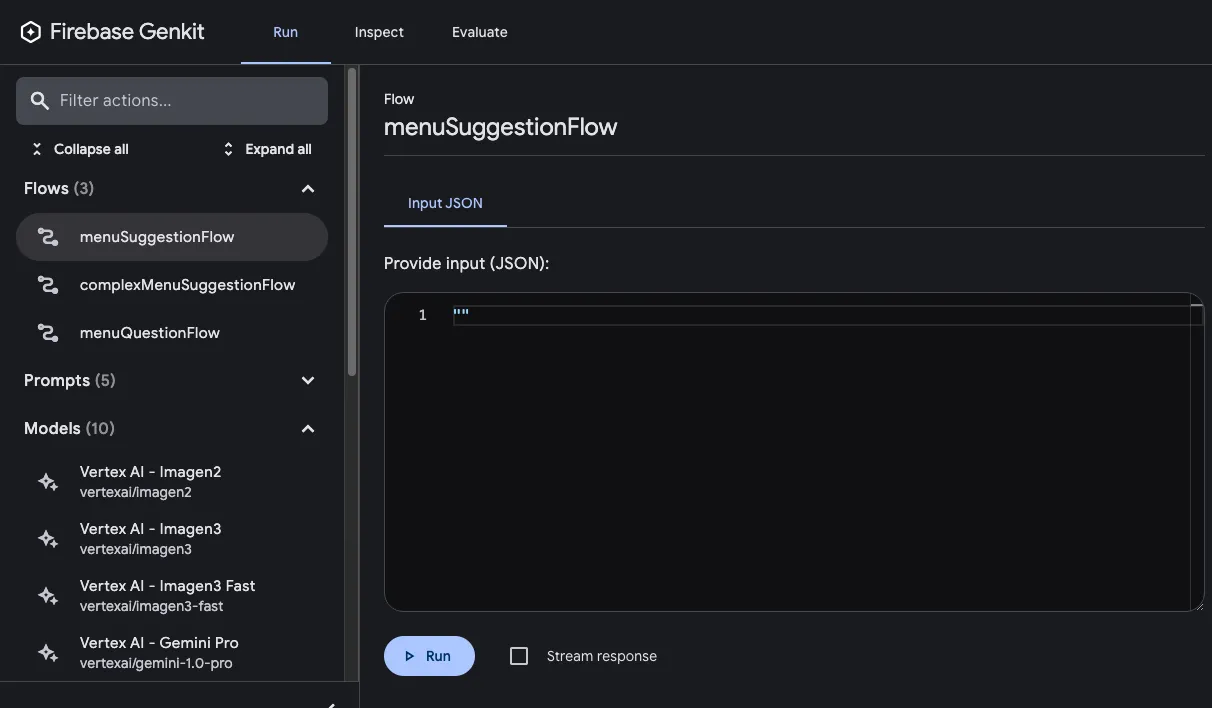
After you’ve run a flow, you can inspect a trace of the flow invocation by either clicking View trace or looking at the Inspect tab.
Flow steps
Section titled “Flow steps”Each of Genkit’s fundamental actions show up as separate steps in the trace viewer:
genkit.Generate()genkit.Embed()genkit.Retrieve()
If you want to include code other than the above in your traces, you can do so
by wrapping the code in a genkit.RunWithContext() call. You might do this for
calls to third-party libraries that are not Genkit-aware, or for any critical
section of code.
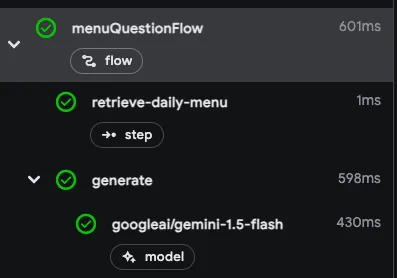
For example, here’s a flow with two steps: the first step retrieves a menu using
some unspecified method, and the second step includes the menu as context for a
genkit.Generate() call.
type MenuQuestionInput struct {    Question string `json:"question"`}
type MenuQuestionOutput struct {    Answer string `json:"answer"`}
menuQuestionFlow := genkit.DefineFlow(g, "menuQuestionFlow",    func(ctx context.Context, input MenuQuestionInput) (MenuQuestionOutput, error) {        menu, err := genkit.RunWithContext(ctx, "retrieve-daily-menu",            func(ctx context.Context) (string, error) {                // Retrieve today's menu. (This could be a database access or                // simply fetching the menu from your website.)                return fetchMenu(ctx)            })        if err != nil {            return MenuQuestionOutput{}, fmt.Errorf("could not retrieve the menu: %w", err)        }
        resp, err := genkit.Generate(ctx, g,            ai.WithPrompt(input.Question),            ai.WithSystem("Help the user answer questions about today's menu."),            ai.WithTextDocs(menu),        )        if err != nil {            return MenuQuestionOutput{}, fmt.Errorf("could not answer the question: %w", err)        }
        return MenuQuestionOutput{Answer: resp.Text()}, nil    })
RunWithContext hands the step its own context, so anything the step starts with
it, an HTTP client or a database call, nests under the step in the trace instead
of beside it under the flow. Use genkit.Run instead when the step is pure work
that traces nothing of its own; it takes a func() (Out, error) with no context.
Because the retrieval step is wrapped in a genkit.RunWithContext() call, it’s
included as a step in the trace viewer:
Deploying flows
Section titled “Deploying flows”You can deploy your flows directly as web API endpoints, ready for you to call from your app clients. Deployment is discussed in detail on several other pages, but this section gives brief overviews of your deployment options.
net/http server
Section titled “net/http server”To deploy a flow using any Go hosting platform, such as Cloud Run, define
your flow using genkit.DefineFlow() and start a net/http server with the
provided flow handler using genkit.Handler():
package main
import (    "context"    "fmt"    "log"    "net/http"    "os"
    "github.com/firebase/genkit/go/ai"    "github.com/firebase/genkit/go/core/status"    "github.com/firebase/genkit/go/genkit"    "github.com/firebase/genkit/go/plugins/googlegenai"    "github.com/firebase/genkit/go/plugins/server")
type MenuSuggestionInput struct {    Theme string `json:"theme"`}
type MenuItem struct {    Name        string `json:"name"`    Description string `json:"description"`}
func main() {    ctx := context.Background()
    g := genkit.Init(ctx, genkit.WithPlugins(&googlegenai.GoogleAI{}))
    menuSuggestionFlow := genkit.DefineFlow(g, "menuSuggestionFlow",        func(ctx context.Context, input MenuSuggestionInput) (MenuItem, error) {            item, resp, err := genkit.GenerateData[MenuItem](ctx, g,                ai.WithPrompt("Invent a menu item for a %s themed restaurant.", input.Theme),            )            if err != nil {                return MenuItem{}, fmt.Errorf("could not invent a menu item: %w", err)            }            if item == nil {                return MenuItem{}, status.Errorf(status.ErrInternal,                    "the model returned no menu item (%s)", resp.FinishReason)            }            return *item, nil        })
    mux := http.NewServeMux()    mux.HandleFunc("POST /menuSuggestionFlow", genkit.Handler(menuSuggestionFlow))
    // Bind 0.0.0.0 and honor $PORT: Cloud Run and most other hosts inject the    // port and health-check the container from outside, so a loopback bind    // fails to start.    port := os.Getenv("PORT")    if port == "" {        port = "3400"    }    if err := server.Start(ctx, "0.0.0.0:"+port, mux); err != nil {        log.Fatal(err)    }}
server.Start() is optional, but it is more than a local-development
convenience: it traps SIGINT and SIGTERM, stops accepting new connections,
and calls http.Server.Shutdown with a fixed 5-second budget to drain
in-flight requests. That budget is not configurable. If a single flow can
legitimately run longer than five seconds, which a multi-turn model call often
does, construct your own http.Server and drain it on your own schedule.
Bind 127.0.0.1 only when you mean local-only, such as while running under the
Developer UI.
To serve all the flows defined in your codebase, you can use
genkit.ListFlows():
mux := http.NewServeMux()for _, flow := range genkit.ListFlows(g) { mux.HandleFunc("POST /"+flow.Name(), genkit.Handler(flow))}if err := server.Start(ctx, "0.0.0.0:"+port, mux); err != nil { log.Fatal(err)}This mounts every registered flow, including any you did not mean to expose. Mount flows one at a time, or filter the list, when the process defines internal flows as well as public ones.
Handling flow errors centrally
Section titled “Handling flow errors centrally”genkit.Handler writes the error itself. When your framework already has one
place that turns an error into a response, use genkit.HandlerFunc instead:
func HandlerFunc(a api.Action, opts ...HandlerOption) func(http.ResponseWriter, *http.Request) errorIt takes the action, not the *genkit.Genkit (api.Action is the interface a
flow, tool, or prompt satisfies), accepts the same HandlerOptions as
genkit.Handler, and panics if an option fails to apply.
The returned function runs the flow and hands you its error, so your own
middleware decides the status and the body:
func withErrors(h func(http.ResponseWriter, *http.Request) error) http.Handler {    return http.HandlerFunc(func(w http.ResponseWriter, r *http.Request) {        err := h(w, r)        if err == nil {            return        }        log.Printf("flow %s failed: %v", r.URL.Path, err)        // PublicMessage substitutes a generic string unless the error was        // built with status.PublicErrorf, so internal detail stays server-side.        msg, _ := status.PublicMessage(err)        http.Error(w, msg, status.Of(err).HTTPCode())    })}
mux.Handle("POST /menuSuggestionFlow", withErrors(genkit.HandlerFunc(menuSuggestionFlow)))
Protecting deployed flows
Section titled “Protecting deployed flows”genkit.Handler performs no authentication. It decodes the request, applies the
HandlerOptions you passed, and runs the flow. A flow you mount is open to
anyone who can reach the port, so put your own middleware in front of it. The
fragments below add strings and github.com/firebase/genkit/go/core to the
imports of the program above:
func requireBearerToken(next http.Handler) http.Handler { return http.HandlerFunc(func(w http.ResponseWriter, r *http.Request) { token := strings.TrimPrefix(r.Header.Get("Authorization"), "Bearer ") if _, err := verifyToken(r.Context(), token); err != nil { http.Error(w, "unauthorized", http.StatusUnauthorized) return } next.ServeHTTP(w, r) })}verifyToken is yours to write against whatever issues your tokens; Genkit does
not supply one.
To let the flow itself see who is calling, pass a context provider. It runs per request and its result becomes the flow’s action context:
func callerFromRequest(ctx context.Context, req core.RequestData) (core.ActionContext, error) {    // req.Headers keys are lowercased.    uid, err := verifyToken(ctx, strings.TrimPrefix(req.Headers["authorization"], "Bearer "))    if err != nil {        return nil, err    }    return core.ActionContext{"uid": uid}, nil}
mux.Handle("POST /menuSuggestionFlow", requireBearerToken(    genkit.Handler(menuSuggestionFlow, genkit.WithContextProviders(callerFromRequest)),))
Inside the flow, read it back with core.FromContext:
uid, _ := core.FromContext(ctx)["uid"].(string)Verify the credential in the middleware, not only in the context provider, so an unauthenticated request never reaches the flow.
Concurrency, timeouts, and lifetime
Section titled “Concurrency, timeouts, and lifetime”A *genkit.Genkit, and the flow, tool, and prompt values the Define*
functions return, are safe for concurrent use by many goroutines; the registry
behind them is mutex-guarded. Create one instance in main(), define every
flow, tool, and schema during startup before the server begins serving, and
share that instance across all request handlers. Constructing a *genkit.Genkit
per request re-runs plugin initialization and is never correct.
Genkit has no timeout option. Bound a flow or a generate call with the standard library:
ctx, cancel := context.WithTimeout(r.Context(), 30*time.Second)defer cancel()The deadline propagates to the model client and to any tool the turn calls. An
expired deadline surfaces as DEADLINE_EXCEEDED, which retry middleware treats
as retryable; an explicit cancellation surfaces as CANCELLED and stops
retries.
Concurrency, cancellation, and lifecycle has the rest: parallel tool fan-out, abandoning a stream, and flushing telemetry on shutdown.
Other server frameworks
Section titled “Other server frameworks”You can also use other server frameworks to deploy your flows. For example, you can use Gin with just a few lines:
router := gin.Default()for _, flow := range genkit.ListFlows(g) { router.POST("/"+flow.Name(), func(c *gin.Context) { genkit.Handler(flow)(c.Writer, c.Request) })}log.Fatal(router.Run(":3400"))Calling deployed flows
Section titled “Calling deployed flows”Once your flow is deployed, you can call it with a POST request:
curl -X POST "http://localhost:3400/menuSuggestionFlow" \ -H "Content-Type: application/json" -d '{"data": {"theme": "banana"}}'For streaming responses, you can add the Accept: text/event-stream header:
curl -X POST "http://localhost:3400/menuSuggestionFlow" \ -H "Content-Type: application/json" \ -H "Accept: text/event-stream" \ -d '{"data": {"theme": "banana"}}'Learn more about deployment
Section titled “Learn more about deployment”For detailed deployment instructions and platform-specific guides, see: